
Database Replication Made Simple
Discovering ReplicaDB on my .NET ML Journey

Boy, do I have a story for you! It's about traversing the treacherous landscapes of database synchronization, stumbling upon a hidden treasure, and emerging victorious in the end. And as a bonus? It’s open source!
The Quest Begins
Like many epic quests, this one started with a simple need. I was on a worldwide hunt (okay, Google search) for a straightforward tool that would allow me to sync databases effortlessly. Now I hear you say, "But we have tons of those in the cloud!" True, if you're only working on PAAS with giants like AWS, you're spoiled for choice. However, if you want to sync from the cloud to an on-premises instance - welcome to the battle bus.
Most of the tools I found were either a) overly complex or b) so crammed with additional features that I don’t need. All I wanted was a simple tool that did one job and did it well.
Enter ReplicaDB
In my series of articles to help .NET Developers to harness the power of machine learning (ML), I recommended using PostgreSQL and its TimescaleDB extension as one of the first steps. While this duo makes handling time series data a breeze.
If you want to track my .NET ML journey with a subset of your own production data (or even all of it), you need this.
ReplicaDB is a tool written in Java for replicating databases from source to sink (hear me out, .NET devs it's worth it). The beauty of ReplicaDB lies in its simplicity - it delivers exactly what it promises, nothing more, nothing less.
ReplicaDB can run quietly in the background and replicates your database with various sync modes. It's like a faithful retriever, picking up your data and keeping it ready for your ML experiments.
The simplicity of the tool belies its power. This tool can be an integral part of your MLOps stack or serve as a simple ETL tool. And all this without any frills or unnecessary complexity.
Quick Guide:
Alright, folks, let's dive into the specifics of setting up ReplicaDB for a PostgreSQL to PostgreSQL replication. Make sure you have your coffee (or tea) ready, because we're about to get our hands dirty with some code!
Step 1: Setting Up
First things first, you'll need to download ReplicaDB from their GitHub repository. Make sure you've got Java installed too (yes, I know, the "J" word, but bear with me).
Once you've got ReplicaDB downloaded and Java sorted, open your terminal (or command prompt for the Windows folks) and navigate to the directory where you've extracted ReplicaDB. It's time to configure your PostgreSQL to PostgreSQL/XXX sync!
Step 2: Configuring the Source and Sink
ReplicaDB uses a properties file to configure the source (the database you're replicating from) and the sink (the database you're replicating to). Here's a simple example of a configuration for a PostgreSQL to PostgreSQL replication:
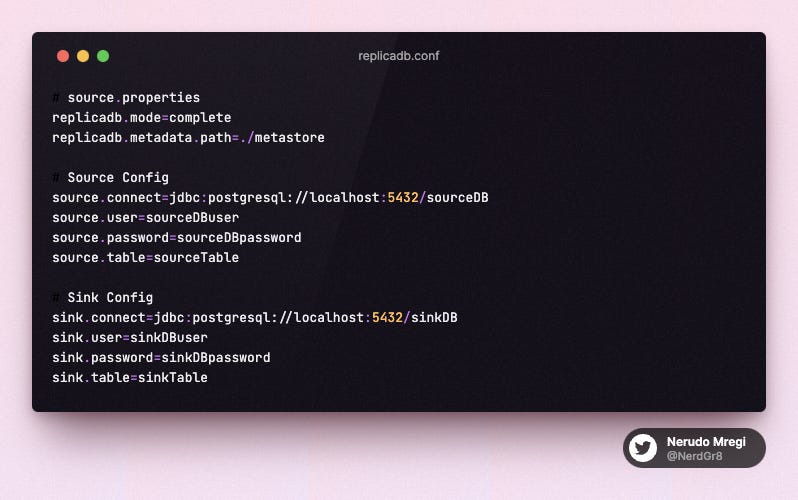
In this example, we're using the complete mode, which will completely replace the data in the sink table with the data from the source table. Other available modes are incremental and incremental-atomic.
Step 3: Running the Sync
Now that we've got our properties file set up, running the replication is as easy as executing the following command in your terminal:
~/bin/replicadb --options-file ./replicadb.conf -j 4 -vAnd voila! Your source database should now be replicating to your sink database.
Wrapping Up
And there you have it - a no-frills, simple database replication with ReplicaDB! Remember, the beauty of this tool is in its simplicity. It can also support more complex replications with custom SQL queries, filters, and transformations.
If you're feeling adventurous, you can explore more advanced uses of ReplicaDB in the official documentation. Now, go forth and sync those databases!